Losing a gas bill always seems to happen at the worst possible time — usually a day or two before the due date, when the postman never showed up or the paper copy ended up buried under a stack of mail you meant to sort weeks ago. If you’re a Sui Northern Gas Pipelines Limited customer, though, this isn’t the crisis it used to be. An SNGPL duplicate bill is just a few clicks away, and you don’t need to stand in a queue at a collection center or call a helpline and wait on hold to get it.
This guide walks through exactly how the process works, what you’ll need before you start, where things commonly go wrong, and what to do once you actually have your bill in hand. Whether you’re in Lahore, Islamabad, Rawalpindi, or a smaller town served by SNGPL, the steps are the same.
What Exactly Is an SNGPL Duplicate Bill?
An SNGPL duplicate bill is simply a reprinted or digital copy of the gas invoice that was originally sent to your address. It carries the same information as the paper bill — your consumer details, billing month, gas units consumed, payable amount, and due date — and it’s treated as a fully valid document for payment purposes. Banks, mobile wallets, and SNGPL’s own collection points all accept it without any issue.
People usually end up needing one for a handful of reasons. Sometimes the postal delivery simply doesn’t arrive on time, especially in areas where courier coverage is inconsistent. Other times the bill gets misplaced at home, torn, or damaged before anyone gets around to paying it. And occasionally, a household just wants to double-check their gas consumption from a previous month without digging through a drawer full of old receipts. In every one of these situations, going online is faster than any alternative.
Why You’d Need One in the First Place
It’s worth pausing on this because it explains why SNGPL built an online system in the first place. Gas billing in Pakistan still relies heavily on physical delivery for the primary copy, and that system has real weak points. Deliveries get delayed during monsoon season, staff shortages slow things down in certain circuits, and in dense urban neighborhoods, mail sometimes ends up at the wrong address entirely.
There’s also the estimated or provisional bill issue. When a meter reader can’t access a property — because of a locked gate, a tenant who isn’t home, or a meter that’s hard to reach — SNGPL sometimes issues an estimated bill based on past consumption patterns rather than an actual reading. These provisional bills can occasionally overstate usage, which is one more reason consumers want quick access to their billing details online: to check the numbers, compare them against previous months, and flag anything that looks off before paying.
What You Need Before You Start
Before opening any website, there’s exactly one piece of information you actually need: your 11-digit Consumer Number, also labeled as the Account ID on your bill. This number is unique to your gas connection and stays the same every month, so once you find it, you can save it somewhere permanent — a notes app, a photo of your meter, wherever you’ll actually remember to look.
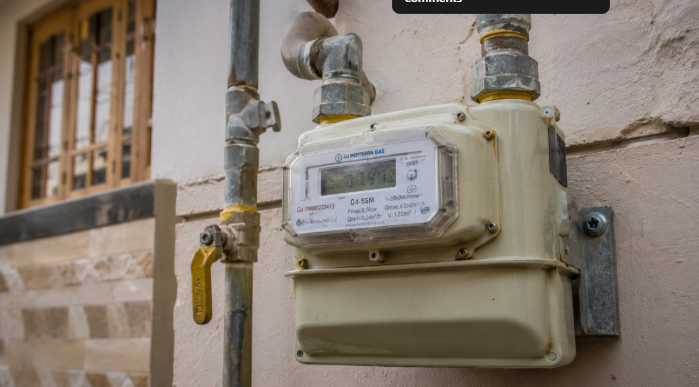
If you still have any previous SNGPL bill lying around, the consumer number is printed near the top of the document, usually close to your name and address, and it’s repeated again on the payment slip portion at the bottom. If you can’t locate an old bill, check the gas meter itself — the number is often printed or stamped on the meter’s front panel, sometimes alongside a scannable code.
One thing worth knowing upfront: SNGPL’s system doesn’t support lookups by CNIC, name, or address. The consumer number is the only key that unlocks your billing information, so if you genuinely can’t find it anywhere, your best bet is calling the SNGPL helpline or visiting a nearby customer service center, where staff can pull it up from their records using your account details.
How to Check Your SNGPL Duplicate Bill Online, Step by Step
Once you have your consumer number in hand, the process itself takes less time than making a cup of tea.
Start by heading to the official SNGPL website. Look for the section dealing with bill information or online billing — it’s usually labeled clearly on the homepage. Enter your 11-digit consumer number exactly as it appears on your old bill, without adding spaces, dashes, or leading zeros that aren’t actually part of the number. You’ll then be asked to complete a captcha verification, which exists to keep the system from being overloaded by automated requests.
After submitting, the portal pulls up your latest bill. From there you can view your payable amount, the due date, the billing month, your consumption in units, and a printable version of the full invoice. If you need a physical copy, your browser’s print function works fine, or you can save it as a PDF for your records.
A quick note on availability: SNGPL’s online system typically shows only the most recent bill, not a full archive going back months or years. If you need an older bill — say, for a tax filing or a dispute over a previous month’s charges — you’ll usually have to visit an SNGPL customer service office in person, since that historical data isn’t part of the standard online duplicate bill feature.
Using a Mobile App or Third-Party Portal
Beyond the official website, there are mobile apps and independent websites that offer the same duplicate bill lookup, often with a cleaner interface or faster loading times on mobile data. These tools work by taking your consumer number and either fetching the data directly or redirecting you to the official SNGPL page to complete the captcha step, since that verification can only happen on SNGPL’s own system for security reasons.
There’s nothing wrong with using these as a convenience layer, but it’s worth being a little careful about which ones you trust. Stick to apps with a reasonable number of downloads and reviews, and never enter banking details, CNIC numbers, or passwords into a third-party site claiming to need them just to show you a gas bill — the consumer number is genuinely the only input required.
Common Problems People Run Into (and How to Fix Them)
Even with a process this simple, a few things trip people up regularly enough that they’re worth addressing directly.
The most frequent issue is a mistyped consumer number. It’s an easy mistake — eleven digits is a lot to copy correctly on a small phone screen, and a single wrong digit will either pull up nothing or throw an error. Before assuming the system is broken, double-check every digit against your old bill or meter, and make sure you’re not accidentally including spaces or a decimal point.
Captcha failures are the second most common complaint, especially during peak hours near the due date when traffic on the site spikes. If the captcha image won’t load or keeps rejecting valid entries, try refreshing the page, switching to a different browser, or waiting fifteen or twenty minutes before trying again. This usually isn’t a problem with your account — it’s just server load.
Some users also run into trouble with PDF downloads that won’t open properly, particularly on older phone browsers. If this happens, try opening the link in a different browser app, or use the print option instead and save it as a PDF through your device’s print dialog rather than downloading a file directly from the site.
And occasionally, the bill simply isn’t showing up online yet even though a paper copy should have arrived. Billing cycles aren’t perfectly instantaneous across every part of the system, so if your bill genuinely isn’t there a day or two into the new billing month, it’s reasonable to wait a short while before assuming something’s gone wrong.
Paying Your Bill Once You Have It
Getting the duplicate bill is only half the job — the other half is actually paying it before the due date to avoid a late payment surcharge or, worse, disconnection warnings for repeated late payments. SNGPL bills can be paid through several channels: designated bank branches, ATMs, mobile banking apps, and services like JazzCash and Easypaisa that many households already use for other utility payments. Some banking apps let you pay directly by scanning the barcode printed on the duplicate bill, which saves you from manually entering the consumer number and amount.
If you’re paying near the deadline, it’s worth allowing a little buffer time. Payments made through third-party apps sometimes take a few hours to reflect in SNGPL’s system, and if you’re paying on the exact due date late at night, there’s a small risk the payment posts the next day instead — which technically counts as late even if you completed the transaction on time from your end.
SNGPL’s Service Area and Who This Applies To
SNGPL covers gas distribution across Punjab, Khyber Pakhtunkhwa, Islamabad, and Azad Jammu and Kashmir, serving cities including Lahore, Rawalpindi, Faisalabad, Multan, Peshawar, Gujranwala, Sialkot, and Sargodha, among others. If your household happens to be in Sindh or Balochistan, your gas connection almost certainly falls under Sui Southern Gas Company (SSGC) instead, and the duplicate bill process there runs on a separate system with its own customer number format — so it’s worth checking which company actually serves your area before searching for the wrong portal.
A Few Practical Habits Worth Building
Once you’ve been through this process a single time, it’s worth setting yourself up so you never have to scramble again. Save a photo of your consumer number somewhere you’ll actually find it — a pinned note, a household document folder, or even a label stuck near the meter itself. If you’re someone who regularly misplaces paper mail, consider checking your bill online proactively around the same date every month rather than waiting for the physical copy to show up at all. It takes less time than the search for a lost bill ever does, and it means you’re never caught off guard by a due date you didn’t see coming.
It’s also worth glancing at your consumption figures each time, not just the amount owed. A sudden spike compared to previous months could point to a leak, a faulty meter, or — as mentioned earlier — an estimated bill that overstated your actual usage. Catching this early, while you still have time before the due date, puts you in a much better position to raise a query with SNGPL than discovering it after you’ve already paid.
Final Thoughts
An SNGPL duplicate bill exists precisely for moments like a missing invoice or a due date creeping up faster than expected, and the online system makes the whole process almost frictionless once you know your consumer number. Keep that eleven-digit code somewhere safe, use the official SNGPL website as your primary source, and treat third-party tools as a convenience rather than a necessity. Handled this way, a lost gas bill goes from being a minor emergency to a two-minute inconvenience — which is really all it should ever be.